


“Imposible traveler” detection with Wazuh
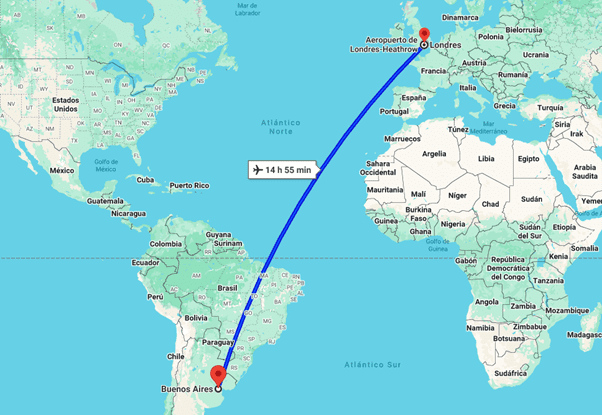
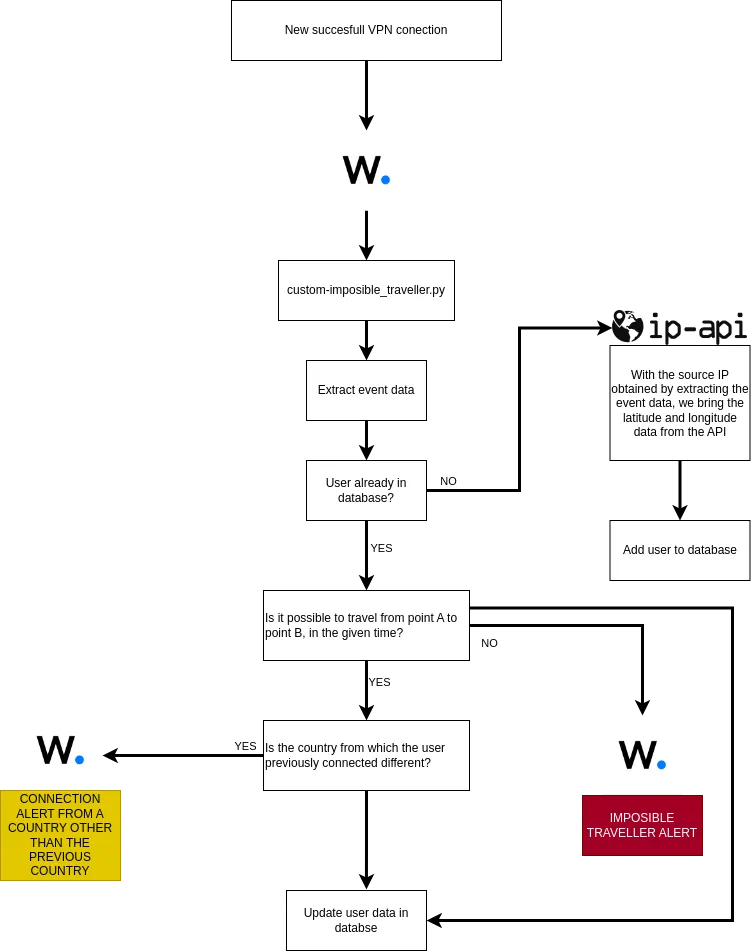
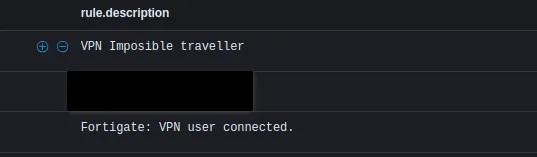
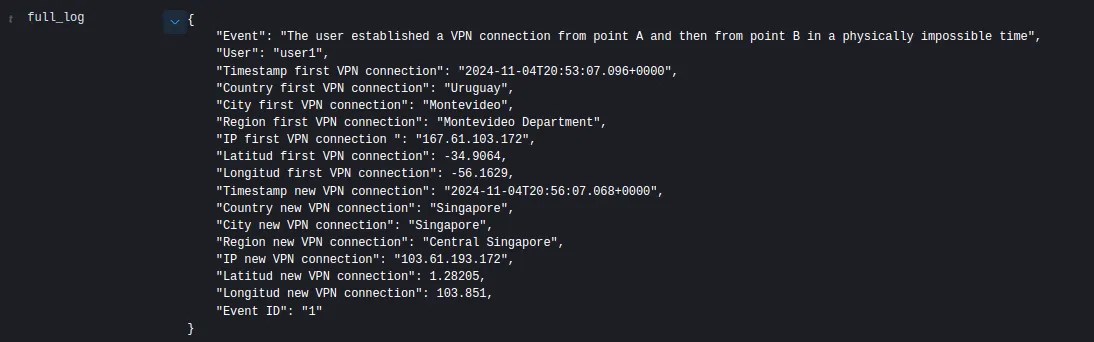
What is the “Impossible Traveler” use case? The concept of “Impossible Traveler” is an anomaly detection technique based on the geographic location of a user’s actions. It is so called because it refers to situations in which a user apparently accesses a system from two or more distant locations in a very short period of time, which would be basically impossible in the real world. This type of behavior may indicate compromised or unauthorized access to an account. Example: A typical example could be if a user, “User1”, logs in from Buenos Aires at 10:00 AM and, about 20 minutes later, logs in from London. Unless “User1” can travel instantaneously between these two points, this event is suspicious and could be because a malicious actor has taken control of the user’s credentials. Approximately how long does it take a person to travel from Buenos Aires to London? Therefore, if we previously detect User1’s VPN access from Buenos Aires, it is impossible for him to be able to access VPN from London 20 minutes later, since at a minimum, the difference between one event and the other should be no less from 2:55 p.m. (approx.). So, if 20 minutes later we detect that you connected via VPN from London, we raise an impossible traveler alert. Objective of this solution The goal of this implementation is to provide a custom solution that enables “Impossible Traveler” detection within Wazuh. Wazuh, although a powerful security and monitoring platform, does not have the native ability to perform correlations based on the geographic location of users over time. Therefore, the use of a Python script is proposed that extracts information about connection events (as in the case of VPN accesses), consults geolocation services to determine the geographical location of the IP, and performs temporal and spatial comparisons to identify suspicious access. This approach provides the flexibility to store and compare user login events, allowing system administrators to be alerted when an “Impossible Traveler” is detected, that is, when a user’s actions appear physically infeasible. Focus on VPN detection In this post, we will focus on detecting “impossible travelers” on VPN connections. However, the approach can be scaled to detect this type of behavior for any type of login or action that is tied to a geographic location. Implementation in Wazuh Wazuh is an open source platform for threat monitoring and detection, offering great flexibility through custom integrations. Although its basic functionality does not include advanced detection based on the geographical location of events, we can extend its capabilities using custom scripts and external APIs. To implement the “Impossible Traveler” use case, we will develop a Python script that will take care of: – Collect information about connection events (in this case, VPN access). – Query a geolocation API to determine the physical location of the IP address associated with each event. – Store this information in a local database. – Compare this data with previous events from the same user. – Determine if the distance and time between two accesses are compatible with a realistic displacement. – Generate alerts if a physically impossible trip is detected. Why do we need a custom script? Although Wazuh has many functionalities, it does not include a built-in ability to correlate multiple events and store location data on the platform for later comparison. Therefore, we implemented a Python script to handle this task efficiently. This approach allows us to: Script Features General script flow: Database The database used is a SQLite3 that will store the following information for each registered VPN connection: Script flowchart Wazuh configurations <group name=»vpn_imposible_traveler»> <rule id=»555555″ level=»0″> <location>Imposible_traveler_VPN</location> <description>Group de reglas viajero imposible</description> </rule> <!– Viajero imposible –> <rule id=»555556″ level=»14″> <if_sid>555555</if_sid> <match>»Event ID»: «1»</match> <description>Viajero Imposible VPN</description> </rule> <!– Conexión previa desde un pais distinto al del nuevo evento –> <rule id=»555557″ level=»3″> <if_sid>555555</if_sid> <match>»Event ID»: «2»</match> <description>El usuario establecio una conexion VPN desde un país distinto al anterior</description> </rule> </group> Configuration inside ossec.conf: <integration> <name>custom-viajero_imposible</name> <rule_id>ID’s-VPN</rule_id> <alert_format>json</alert_format> </integration> Once we have this, we need to paste the following script into /var/ossec/integrations. SCRIPT: #!/var/ossec/framework/python/bin/python3 import json # Global vars def main(): # Read alerts.json alert_timestamp = alert_json[‘timestamp’] #Posibles srcip alert_user = alert_json[‘data’][‘dstuser’] # IP-API info # Read database # Create a cursor object cursor.execute(”’ user_in_db = cursor.fetchone() # If user exist in db, check if it possible to travel from point A to B if not is_possible_travell(user_in_db[0], alert_timestamp, coords_existent_event, coords_new_event): # Wazuh alert log msg = json.dumps(msg, ensure_ascii=False, indent=4) send_to_wazuh(sock, msg) # Case in wich user connects from one country and then from another country but in range of time acceptable, it is interesting to generate an alert and analyze it # Wazuh alert log msg = json.dumps(msg, ensure_ascii=False, indent=4) send_to_wazuh(sock, msg) # Finally, regardless of whether it is possible to travel or not, update the data with the new event. with open(‘/var/ossec/logs/integrations.log’, “a”) as file: else: cursor.execute(”’ with open(‘/var/ossec/logs/integrations.log’, “a”) as file: # Save the changes made to the database and close the connection except Exception as e: def send_to_wazuh(sock, msg): with open(‘/var/ossec/logs/integrations.log’, “a”) as file: # Function to calculate if it is possible to travel between two places with the given time # Calculate the time difference in hours velocity = 800 # Average airplane speed in km/h # Calculate the time required to travel the distance at the given speed # Check if the trip is possible def query_api(ip): if response.status_code == 200: if __name__ == “__main__”: Then assign the necessary permissions to the file: chown root:wazuh custom-Imposible_traveller.py chmod 750 custom-Imposible_traveller.py Finally, we must generate the SQLite database, save it in /var/ossec/var/db/ and assign permissions to it. This database has to be a table with the fields specified above. Example script to create database: Sample Initially, we will establish a VPN connection with the user: user1 from the IP: 167.61.103.172. The user will be added to the database: Then, we will establish a VPN connection with the same user, user1, but from a different IP address, simulating another location, and using a timestamp that makes it impossible to reach that point in the indicated time. Result: The user data is updated with the new event data: Possible Improvements Conclusion Need help? Datasec is a company dedicated exclusively to providing services, training, and software in the field of information security and cybersecurity. With more than 30 years of uninterrupted history, we have developed a unique combination of knowledge, software and experience. Website: https://datasec-soft.com/en/ Contact Us: https://datasec-soft.com/en/contact-us/ “Imposible traveler” detection with Wazuh
import sys
import time
import os
from socket import socket, AF_UNIX, SOCK_DGRAM
from datetime import datetime
from geopy.distance import geodesic
import requests
import sqlite3
SOCKET_ADDR = ‘/var/ossec/queue/sockets/queue’
BD = ‘/var/ossec/var/db/DB_Imposible_traveller.db’
try:
sock = socket(AF_UNIX, SOCK_DGRAM)
sock.connect(SOCKET_ADDR)
alert_file = open(sys.argv[1])
alert_json = json.loads(alert_file.read())
alert_file.close()
posibles_srcip = [‘srcip’, ‘src_ip’, ‘remip’]
for key in alert_json[‘data’]:
if key in posibles_srcip:
alert_srcip = alert_json[‘data’][key]
break
new_event = query_api(alert_srcip)
coords_new_event = (new_event[3], new_event[4])
# Connect to SQLite database
conn = sqlite3.connect(BD)
cursor = conn.cursor()
SELECT * FROM logs WHERE user = ?
”’, (alert_user,))
if user_in_db:
coords_existent_event = (user_in_db[3], user_in_db[4])
msg = {
“Event”: “The user established a VPN connection from point A and then from point B in a physically impossible time”,
“User”: alert_user,
“Timestamp first VPN connection”: user_in_db[0],
“Country first VPN connection”: user_in_db[5],
“City first VPN connection”: user_in_db[6],
“Region first VPN connection”: user_in_db[7],
“IP first VPN connection “: user_in_db[2],
“Latitud first VPN connection”: user_in_db[3],
“Longitud first VPN connection”: user_in_db[4],
“Timestamp new VPN connection”: alert_timestamp,
“Country new VPN connection”: new_event[0],
“City new VPN connection”: new_event[1],
“Region new VPN connection”: new_event[2],
“IP new VPN connection”: alert_srcip,
“Latitud new VPN connection”: new_event[3],
“Longitud new VPN connection”: new_event[4],
“Event ID”: “1”
}
elif user_in_db[5] != new_event[0]:
msg = {
“Event”: “The user established a VPN connection from one country and then from another different country in reasonable times, validate with client”,
“User”: alert_user,
“Timestamp first VPN connection”: user_in_db[0],
“Country first VPN connection”: user_in_db[5],
“City first VPN connection”: user_in_db[6],
“Region first VPN connection”: user_in_db[7],
“IP first VPN connection”: user_in_db[2],
“Latitud first VPN connection”: user_in_db[3],
“Longitud first VPN connection”: user_in_db[4],
“Timestamp new VPN connection”: alert_timestamp,
“County new VPN connection”: new_event[0],
“City new VPN connection”: new_event[1],
“Region new VPN connection”: new_event[2],
“IP new VPN connection”: alert_srcip,
“Latitud new VPN connection”: new_event[3],
“Longitud new VPN connection”: new_event[4],
“Event ID”: “2”
}
cursor.execute(”’
UPDATE logs
SET timestamp = ?, srcip = ?, lat = ?, lon = ?, country = ?, city = ?, regionName = ?
WHERE user = ?
”’, (alert_timestamp, alert_srcip, new_event[3], new_event[4], new_event[0], new_event[1], new_event[2], alert_user))
file.write(f’User {alert_user} updated’)
INSERT INTO logs (timestamp, user, srcip, country, city, regionName, lat, lon)
VALUES (?, ?, ?, ?, ?, ?, ?, ?)
”’, (alert_timestamp, alert_user, alert_srcip, new_event[0], new_event[1], new_event[2], new_event[3], new_event[4]))
file.write(f’User {alert_user} added to database’)
conn.commit()
conn.close()
with open(‘/var/ossec/logs/integrations.log’, “a”) as file:
file.write(str(e))
finally:
sock.close()
string = f’1:Imposible_traveler_VPN:{msg}‘
sock.send(string.encode())
file.write(f’Alerta enviada a Wazuh {string}‘)
def is_possible_travell(tiempo_a, tiempo_b, coords_a, coords_b):
# Calculate distance between points A and B using geopy (geodesic)
distance = geodesic(coords_a, coords_b).kilometers
fmt = “%Y-%m-%dT%H:%M:%S.%f%z” # Date and time format
time_a_dt = datetime.strptime(tiempo_a, fmt)
time_b_dt = datetime.strptime(tiempo_b, fmt)
delta_time = abs((time_b_dt – time_a_dt).total_seconds() / 3600) # Convert hours to seconds
time_necessary = distance / velocity
return delta_time >= time_necessary
url = f’http://ip-api.com/json/{ip}?fields=country,regionName,city,lat,lon,query’
response = requests.get(url)
data = response.json()
return data[‘country’], data[‘city’], data[‘regionName’], data[‘lat’], data[‘lon’]
else:
return None
main()#/var/ossec/framework/python/bin/python3
import sqlite3
# Connect to SQLite database (or create it if it doesn't exist)
conn = sqlite3.connect('/var/ossec/var/db/DB_Imposible_traveller.db')
# Create a cursor object to interact with the database
cursor = conn.cursor()
# Create table with the specified columns
cursor.execute('''
CREATE TABLE IF NOT EXISTS logs (
timestamp TEXT,
usuario TEXT,
srcip TEXT,
lat REAL,
lon REAL,
country TEXT,
city TEXT,
regionName TEXT
)
''')
# Commit the changes and close the connection
conn.commit()
conn.close()
print("Table created successfully!")

Some additional optimizations that can be implemented include:
The “Impossible Traveler” use case is a powerful anomaly detection technique that can help prevent unauthorized access to critical systems. The integration of a custom script with Wazuh allows us to store, compare, and analyze logins in an advanced manner, generating alerts when suspicious access is detected. This solution is flexible and scalable, making it applicable to other types of events beyond VPN connections.